

You can stop over-lifting by using safety limits in new reach stackers. These limits help keep port work safe from accidents and damage. CEGC makes Reach Stacker: prevent over-lift with limits by using smart systems and teaching operators. Here is how safety features help in real life:
|
Safety Feature |
Description |
|---|---|
|
Electronic Monitoring |
Watches the load and stops lifting if it gets too heavy. |
|
Overload Activation |
Turns on when the load is too much to stop tip-overs. |
|
Operator Training |
Makes sure you know the equipment limits and follow safety rules. |
Key Takeaways
-
Use safety limits and smart systems to stop over-lifting. These features help make work safe and fast.
-
Always look at the load chart before you lift. This helps you know the weight limits and stops accidents.
-
Regular training and safety checks are very important. They help operators learn and get ready for dangers.
Over-Lifting Risks And Safety Basics
What Is Over-Lifting?
Over-lifting happens when you try to lift a load that is too heavy or not balanced for your reach stacker. This can make the stacker tip over. It can also break containers or hurt people nearby. Over-lifting often happens if you do not follow the machine’s limits or forget to check the load weight. You should always look at the lifting chart and use the right controls to stay safe.
In 2010, a worker died at a rail yard in Colorado. The worker was crushed between a reach stacker tire and a railcar. The operator could not see the worker because of a blind spot.
Why Safety Matters For Reach Stackers
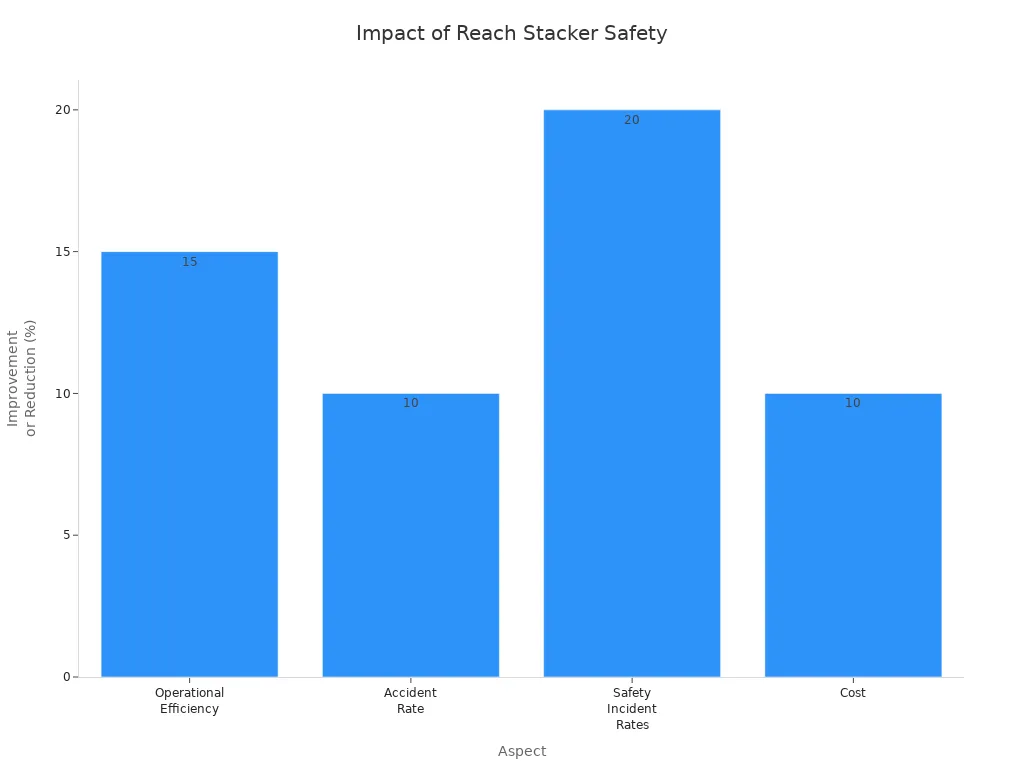
Safety is the most important thing when using a reach stacker. If you follow safety rules, you keep yourself and your team safe. You also protect the equipment. Bad safety can cause accidents, injuries, and slow down work. Good safety helps your port work better and saves money by stopping delays and repairs.
|
Aspect |
Improvement/Impact |
Description |
|---|---|---|
|
Operational Efficiency |
15% improvement |
Managing assets and risks helps the stacker work better. |
|
Accident Rate |
10% reduction |
Training focused on safety lowers the number of accidents. |
|
Safety Incident Rates |
20% improvement |
Using better safety steps makes the workplace safer. |
|
Cost |
10% reduction |
Taking care of equipment and parts saves money. |
Common Causes Of Over-Lifting
There are many dangers when you use a reach stacker. Some dangers are poor visibility, ground that is not stable, and being tired. Here are some common reasons for over-lifting:
-
Blind spots make it hard to see and can cause accidents.
-
Driving unsafely or turning too fast.
-
Not having enough training or not knowing the controls.
-
Lifting loads the wrong way or carrying them badly.
-
Not checking around you before lifting.
-
Ignoring alarms or warning signals from the stacker.
If you skip safety checks or ignore warnings, you can get hurt or hurt others. Always follow safety rules and get training often to stay safe.
Reach Stacker: Prevent Over-Lift With Limits
Safety Limits And Controls
You need good safety features to keep your reach stacker safe. Modern stackers use smart systems to help stop over-lifting. These systems have anti-sway control, overload protection, and safety interlocks. CEGC makes reach stacker: prevent over-lift with limits to meet market standards. They also let you change features for your port.
|
Safety Feature |
Description |
|---|---|
|
Stability Controls |
Help your stacker stay balanced when lifting containers. |
|
Stop the stacker from lifting more than it should. |
|
|
Elevated Cabin |
Give you a better view of the loading area. |
|
Cabin Design |
Keep you safe from falling containers. |
|
Emergency Stop Buttons |
Let you stop everything fast if there is danger. |
|
Clear Signaling Systems |
Give you warnings and alerts about the stacker’s status. |
Safety interlocks use sensors to check where containers are. They make sure you are ready before the stacker works. Inclination and optical distance sensors help you put containers in the right spot. Operator presence sensing systems check if you are in the cab and ready. Overload protection systems watch the load and sound alarms or stop lifting if it is too heavy. This helps stop accidents and keeps your stacker safe.
Load charts help operators know how much they can lift at different heights and spots. This stops over-lifting and keeps everyone safe.
You must look at the load chart before every lift. The chart shows the weight limit at each height and position. It also tells you how attachments change the max load. If you follow the chart, you stop over-lifting and keep the stacker steady.
Operator Steps For Safe Lifting
You are important in reach stacker: prevent over-lift with limits. You must follow steps for safe lifting and stacking. These steps help you use safety features the right way.
-
Warm up the engine for a few minutes first.
-
Get in the cab using three points of contact. Buckle your seatbelt.
-
Adjust your seat and mirrors so you can see well.
-
Line up the stacker with the container. Lower the spreader until it is flat.
-
Wait for all four twistlocks to lock. Check the lights.
-
Lift the container slowly. Watch the load meter and stay safe.
-
Move the container to the stack. Keep it level and do not move too fast.
-
Lower the container carefully. Make sure it is flat and secure.
-
Unlock the twistlocks only when the container is steady.
-
At the end of your shift, park on flat, hard ground. Do not park on slopes or soft dirt.
-
Put the controls in neutral.
-
Set the parking brake.
-
Lower all arms and tools to the ground.
-
Turn off the engine and take out the key.
-
Lock the cab and use security features.
-
Use wheel chocks if you park on a hill.
-
Make sure you do not block traffic or exits.
You must check the stacker before you use it. Look at tires, brakes, hydraulics, engine, lights, and safety devices. Check for leaks, worn tires, and make sure safety features work. Inspect oil, coolant, tire pressure, horn, and fire extinguisher. This check helps you find problems early and keeps your stacker safe.
|
Inspection Item |
Purpose |
|---|---|
|
Tires |
Make sure you have good grip and balance |
|
Brakes |
Make sure you can stop safely |
|
Hydraulic systems |
Check for leaks and if they work right |
|
Engine |
Make sure it is ready to use |
|
Lights |
Make sure you can see and signal |
|
Safety devices |
Make sure all safety parts work |
|
Oil |
Make sure things are oiled |
|
Coolant |
Stop the engine from getting too hot |
|
Tire pressure |
Keep the stacker steady and safe |
|
Horn |
Make sure you can warn others |
|
Fire extinguisher |
Make sure it is ready for emergencies |
|
Leaks |
Find things that could be dangerous |
|
Worn tires |
Make sure you can use the stacker safely |
|
Working safety devices |
Make sure all safety parts work |
You must use emergency stop buttons if you see danger. Emergency stop systems stop all controls and keep you safe if something goes wrong. Buttons are inside and outside the stacker. Only use bypass if it is safe. Always check twistlock lights to make sure containers are locked before lifting.
Avoiding Common Mistakes
You can stop mistakes by using safety features and getting training. Many accidents happen when you ignore warnings or skip safety steps. Operator skills can change how safe things are. CEGC gives you easy-to-use HMI with clear alarms and status screens to help you act fast.
Here are common mistakes and how to stop them:
-
Not looking at load charts or lifting too much weight.
-
Skipping the safety check before using the stacker.
-
Not watching warning lights or alarms while working.
-
Driving too fast or turning suddenly.
-
Not checking how the weight is spread before lifting.
-
Not using emergency stop controls when needed.
-
Forgetting to lock containers with twistlocks.
Operator training helps stop over-lifting. You learn how to use controls and safety features. RTITB Accredited Partners give good training materials for everyone. Training often helps you stay sharp and safe.
You must know how HMI and alarms work. These systems help you lift and stack safely. They warn you about overload, unsafe things, or wrong controls. If you listen to alarms and warnings, you stop accidents and keep your stacker safe.
Tip: Always check the load chart, do a safety check, and use all safety features and controls. This keeps your reach stacker safe and stops over-lifting.
CEGC lets you pick sensor sets, anti-collision zones, and extra safety. You can choose what works best for your port. Reach stacker: prevent over-lift with limits by using smart safety features, operator training, and easy controls. You keep your port safe, working well, and reliable.
You can stop over-lifting by using smart safety systems and checking your machine every day. Operators need to watch for all warnings and finish training many times. Smart controls, fixing problems before they happen, and anti-sway features help stop accidents. CEGC solutions make your machine work better and keep people safe. When you get good training and listen to warnings, your port works well.
|
Safety System |
Function |
|---|---|
|
Dynamic Tilt Protection |
Stops the stacker from tipping over by changing limits when it gets dangerous. |
|
Automatic Speed and Lift Limitation |
Keeps the stacker steady and stops accidents. |
|
Load and Overload Monitoring |
Gives warnings and stops the stacker if it is not safe. |
|
Automatic Braking and Obstacle Detection |
Finds things in the way and stops the stacker by itself. |
-
Pick a reach stacker that can lift the right amount.
-
Operators must check that the stacker can lift the container weight.
-
Make sure it is easy to fix and has good safety features.
FAQ
How do you know if a reach stacker is overloaded?
You see warning lights or hear alarms. The display shows the load weight. Always check the load chart before lifting.
What should you do if the reach stacker alarms sound?
Stop lifting right away. Lower the load safely. Check the display for warnings. Call maintenance if you cannot fix the problem.
Can you customize safety features on CEGC reach stackers?
Yes. You can choose sensor sets, anti-collision zones, and extra safety options for your port’s needs.


